Compare · LibreSprite vs Pixelorama
LibreSprite vs Pixelorama
Both are free, open-source sprite editors with layers, a timeline and onion skin. LibreSprite is the 2016 Aseprite code, kept alive by its community. Pixelorama is a newer editor built on the Godot engine that adds features quickly. We ran Pixelorama 1.2.3 on Linux and in the browser, opened our LibreSprite files in it and compared the two.
On this page 5 sections
Short answer
Is LibreSprite or Pixelorama better?
For the classic Aseprite workflow (fast pencil work, frame-by-frame animation, sprite sheets, a command line for batch export, JavaScript scripting), pick LibreSprite. For built-in effects, tilemaps, reference images and a full browser version, pick Pixelorama. Both are free, and Pixelorama opens LibreSprite’s .ase files with layers, frames and tags intact, so you can try both on the same artwork.
Pick LibreSprite if…
- you want Aseprite’s layout and shortcuts (most Aseprite tutorials apply)
- you export sheets or GIFs in bulk from the command line
- you script in JavaScript
- you want an Android build (1.2 APK, tested)
Pick Pixelorama if…
- you want effects such as outline, gradients and colour adjustments in a menu
- you make tile-based maps
- you need the same editor in a browser, with no install
- you like a more modern, dockable interface
What we tested
| LibreSprite 1.3 | Pixelorama 1.2.3 | |
|---|---|---|
| Linux download | AppImage, 93.5 MB | tar.gz, 31.2 MB (program + data file) |
| Browser | Unofficial web builds only: LibreSprite online | Official web build (Godot 4.7.2 engine, ran in Chromium) |
Opens our sprout.ase | Its own file | Yes: layers Leaf/Body, frames 1–4, tag “walk”, palette |
| Opens our animated GIF | Yes | Yes, 4 frames |
| Opens a PNG sprite sheet | Yes (Import Sprite Sheet) | Yes |
| Licence | GPLv2 | MIT |
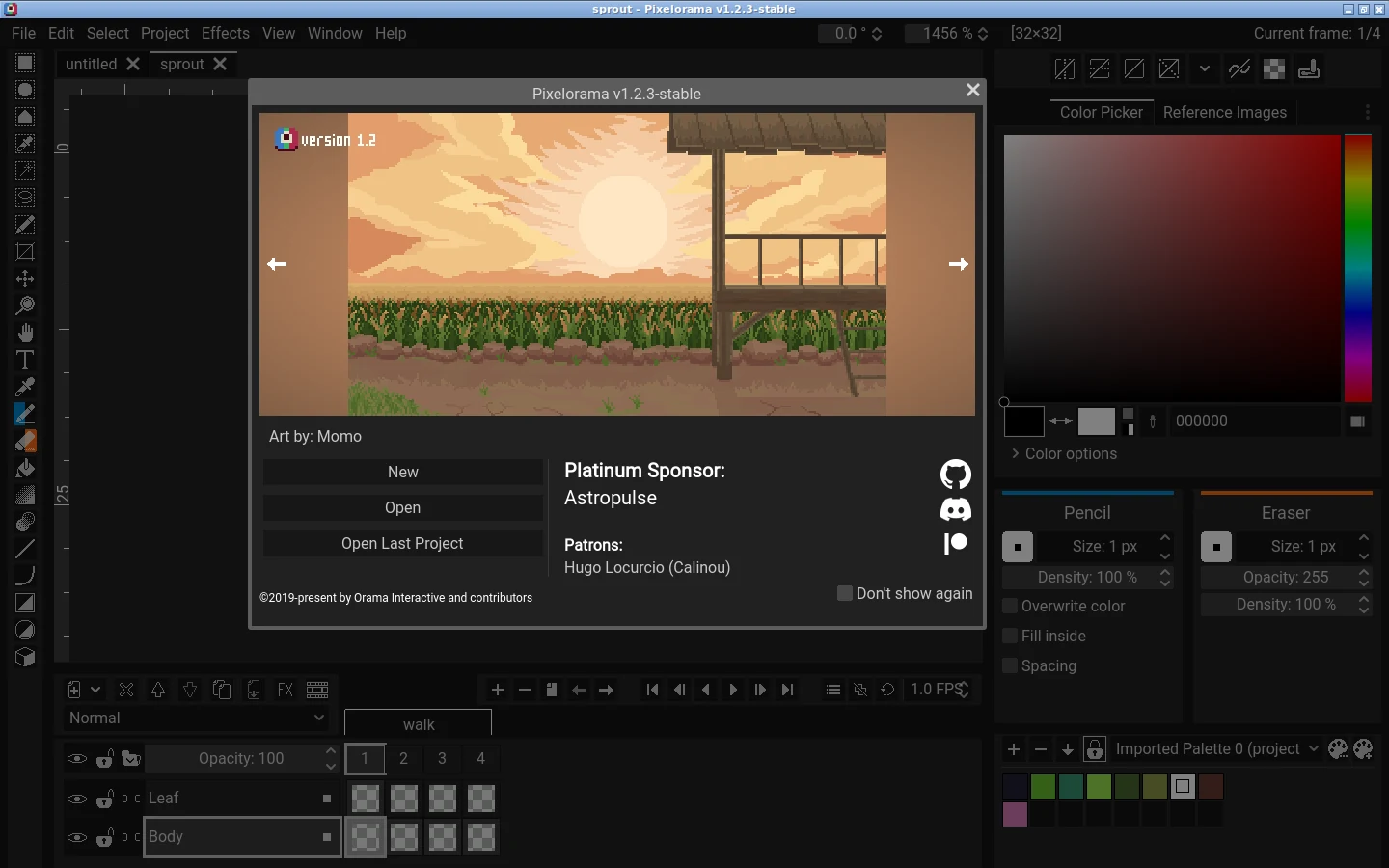
Pixelorama ran on a clean Ubuntu 24.04 virtual machine (a GitHub runner); its web build ran in a headless Chromium. LibreSprite facts come from our own tests on Linux, Windows and macOS. Details: how we test.
Feature comparison
“Seen” means we saw it in Pixelorama 1.2.3’s menus or dialogs; “per its docs” means it comes from Pixelorama’s own feature list and we did not try it.
| Feature | LibreSprite 1.3 | Pixelorama 1.2.3 |
|---|---|---|
| Layers, frames, onion skin, tags | Yes | Yes (seen) |
| Per-frame duration | Yes, in ms (P) | A project FPS (it read 1.0 FPS after opening our file) and a Properties entry on each frame (seen; not tested further) |
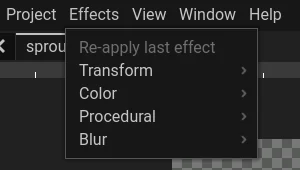
| Effects menu (outline, gradient, colour adjustments, blur…) | No: Color Curve, Replace Color, Invert, Convolution Matrix, Despeckle | Yes: Transform, Color, Procedural and Blur groups (seen) |
| Tilemaps | No (Tiled Mode preview only) | Yes (per its docs) plus Tile Mode preview (seen) |
| Reference images | Workaround: a faded, locked layer (guide) | Yes, a dedicated panel (seen) |
| Separate tools on left and right mouse buttons | No: left = foreground colour, right = background colour | Yes (seen: Pencil / Eraser panels) |
| Mirror view, pixel indices, grayscale view | Symmetry drawing; no mirror view | Yes (seen in View) |
| Symmetry drawing | Yes: horizontal, vertical, ±45°, rotational | Yes (per its docs) |
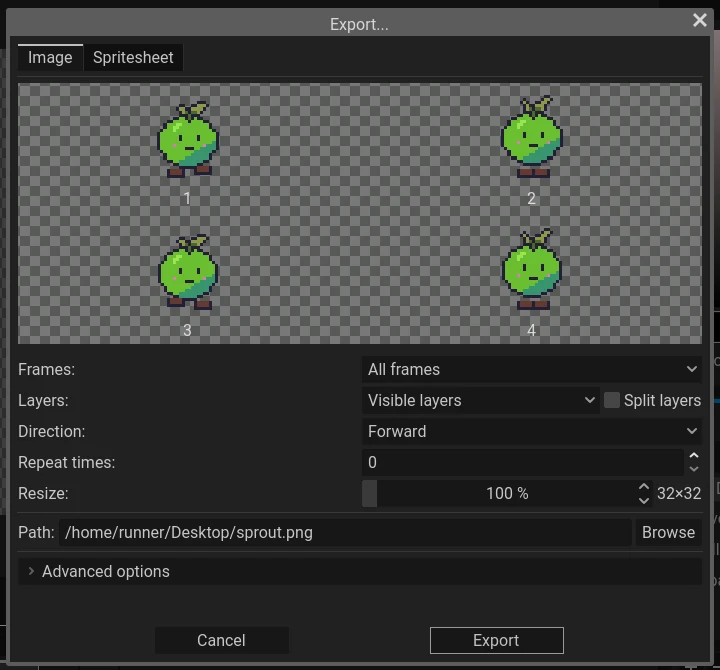
| Export: PNG, GIF, sprite sheet | Yes, sheets with JSON | Yes: Image and Spritesheet tabs, split layers, direction, repeat (seen) |
| Command-line batch export | Yes: CLI guide | Not tested |
| Scripting / extensions | JavaScript (QuickJS); themes | Extensions (per its docs) |
| Native file | .ase (opens in Aseprite and Pixelorama) | .pxo (LibreSprite cannot open it) |
| Platforms | Windows, macOS, Linux, Android APK | Windows, macOS, Linux, web |
Moving between them
- LibreSprite → Pixelorama: open the
.asedirectly. In our test, layers, frames, the tag and the palette came across. - Pixelorama → LibreSprite: LibreSprite cannot read
.pxo. Export from Pixelorama as a PNG sprite sheet (one row) or a GIF, then in LibreSprite use File → Import Sprite Sheet, or just open the GIF. Layers are flattened that way; export one sheet per layer if you need them. - Game engines read sheets from both. LibreSprite adds JSON with frame durations and tags: Godot guide.
How they feel
LibreSprite is compact: one window, the timeline at the bottom, everything reachable by a key. Pixelorama looks more like a modern creative app, with dockable panels (Color Picker, Reference Images, separate panels for the left and right tool). It is also developing faster. On the other hand, LibreSprite’s keys and menus match Aseprite, so years of Aseprite tutorials still apply.
FAQ
Can Pixelorama open Aseprite or LibreSprite files?
Yes. Pixelorama 1.2.3 opened our LibreSprite .ase file with its two layers, four frames, the tag and the palette.
Can LibreSprite open Pixelorama .pxo files?
No. Export a PNG sheet or GIF from Pixelorama first.
Which one runs in a browser?
Pixelorama has an official web version. LibreSprite has only unofficial web builds; see LibreSprite online.
Are both really free?
Yes, both are free and open source with no paid tier: LibreSprite under GPLv2, Pixelorama under MIT.
Which is better for beginners?
Both are approachable. LibreSprite has fewer panels to learn; Pixelorama gives more help through effects. Our first character guide uses LibreSprite.
Keep going
Found something wrong or out of date? Tell us: hello@libresprite.dev. We fix mistakes within a day.