Free tool · Upscaler
Pixel art upscaler
Make small pixel art big without a single blurry pixel. Drop in a PNG, pick a whole-number scale, download. It runs entirely in your browser; your image is never uploaded.
On this page 5 sections
No image yet.
Short answer
How do I upscale pixel art without blurring it?
Use nearest-neighbour scaling by a whole number (2×, 3×, 4×…). Every pixel becomes an exact square of 4, 9 or 16 pixels, with no new in-between colours. Smooth methods (bilinear, bicubic, “auto”) and odd sizes like 150 % are what make pixel art blurry or uneven. The tool above does it right; in LibreSprite use Export’s Resize option, Sprite Size with Nearest-neighbor, or --scale on the command line.
Why pixel art gets blurry
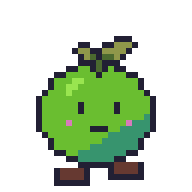

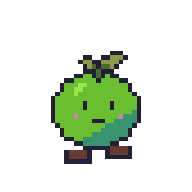
Comparison images: frame 1 of our demo sprite, scaled with the Pillow imaging library.
Two separate problems: filtering (the program blends neighbouring pixels: blur) and non-integer scales (some pixels become 4 screen pixels wide, others 5: wobbly lines). Avoid both.
Fix blur in game engines and on the web
| Where | Setting |
|---|---|
| Godot 4 | Project Settings → Rendering → Textures → Canvas Textures → Default Texture Filter: Nearest. For crisp scaling of the whole game, set Display → Window → Stretch → Scale Mode to integer. |
| Godot 3 | Select the image, Import tab → Preset 2D Pixel (Filter off) → Reimport. |
| Unity | Select the sprite texture → Filter Mode: Point (no filter), Compression: None, and Pixels Per Unit equal to your tile size. Unity guide. |
| GameMaker | Game Options → Graphics → untick Interpolate colours between pixels. |
| Web pages (CSS) | image-rendering: pixelated; on the <img> or <canvas>, and set its size to a whole multiple of the image size. |
| Social media | Upload a pre-scaled copy (4× or more) as PNG; sites re-compress and smooth small images. |
Upscale in LibreSprite itself
- File → Export has a Resize setting (100 % to 1000 %): your working file stays small, the exported copy is scaled with crisp pixels.
- Sprite → Sprite Size with method Nearest-neighbor scales the file itself. Keep a copy of the original.
- Command line:
libresprite -b walk.ase --scale 4 --save-as walk-x4.gifalso scales animations, which this browser tool doesn’t (it reads only the first frame of a GIF). CLI guide.
Undo upscaling (find the true size)
Downloaded a sprite that was already enlarged? The tool checks whether the image is made of identical N × N blocks and shows the true size. Tick Undo existing upscaling first and set Scale to 1× to get the original back, ready to edit in LibreSprite. It only works on clean nearest-neighbour enlargements, not on blurred or JPEG-compressed images.
FAQ
What is the best scale for pixel art?
Any whole number. For screens, pick the largest whole multiple that fits: a 320 × 180 game fits a 1920 × 1080 screen exactly at 6×. See the canvas size guide.
Can I upscale an animated GIF?
Not in this tool (it reads the first frame). Use LibreSprite: open the GIF and export with Resize, or --scale on the command line.
Are AI upscalers good for pixel art?
They redraw the image with smooth detail and new colours, which is the opposite of pixel art. Use them only if you want a painted look.
Is there a size limit?
Only your browser’s memory. Results above about 64 megapixels may be slow or fail.
Keep going
Found something wrong or out of date? Tell us: hello@libresprite.dev. We fix mistakes within a day.