Compare · LibreSprite vs Aseprite
LibreSprite vs Aseprite
LibreSprite is Aseprite, as it was in August 2016: the last version you were allowed to copy and share. Ten years on, the two have split into a free, community-run editor and a paid, actively developed one. Here is what that means in practice, with the file-compatibility claims tested on real .aseprite files.
On this page 9 sections
Short answer
Is LibreSprite the same as Aseprite?
No, but they share their roots. LibreSprite is a fork of Aseprite’s last GPL-licensed code (commit 03be4aa, August 2016). Aseprite then switched to a proprietary licence and kept adding features: layer groups, tilemaps, slices, a gradient tool, Lua scripting. LibreSprite stayed free and open source (GPLv2) and is now at version 1.3. They look and work alike, use the same file format family and mostly the same shortcuts, but LibreSprite lacks most features Aseprite added since 2016.
Pick LibreSprite if…
- you want a free, open-source editor you can share, modify or bundle (GPLv2)
- you draw sprites and frame-by-frame animation and export PNGs, GIFs and sprite sheets
- you are teaching a class or setting up many computers
- you want to script it in JavaScript
Pick Aseprite if…
- you need layer groups, tilemaps, slices or reference layers
- you rely on Aseprite tutorials, Lua scripts or extensions
- you want frequent updates and a big plugin ecosystem
- $19.99 once (its Steam price on 1 Nov 2026) is fine for you
One editor, two paths: the timeline
- Aseprite begins (by David Capello) as a free, open-source sprite editor.
- Aseprite on Steam, as a paid product (its source was still GPL).
- Aseprite changes licence (commit
5ecc356): from then on the code is under a proprietary EULA. - LibreSprite is created from the last GPLv2 commit,
03be4aa. - Aseprite 1.2: layer groups, slices, and more.
- LibreSprite 1.0
- Aseprite 1.3: tilemaps, Lua scripting improvements and more.
- LibreSprite 1.1
- LibreSprite 1.2
- Aseprite 1.3.18.6, the latest at the time of writing.
- LibreSprite 1.3, the version this site documents (new symmetry modes, pixel-art line snapping).
Dates from the GitHub tags of both projects, LibreSprite’s repository creation date and Aseprite’s Steam page. More on each LibreSprite version: release history.
Feature comparison
LibreSprite 1.3 versus Aseprite 1.3.18.6. LibreSprite facts come from our own tests and its source code; Aseprite facts come from its data/gui.xml (the file that defines its menus, tools and keys) and its official pages.
| Feature | LibreSprite 1.3 | Aseprite 1.3.18.6 |
|---|---|---|
| Layers, blend modes, opacity, linked cels | Yes | Yes |
| Layer groups (folders) | No | Yes |
| Tilemap layers and tilesets | No (Tiled Mode and grid only) | Yes |
| Reference layers | No (use a locked, faded layer) | Yes |
| Slices (9-slice, named regions) | No | Yes |
| Frames, onion skin, tags (forward, reverse, ping-pong) | Yes | Yes, plus tag repeat counts |
| Pixel-perfect strokes, Shading ink | Yes | Yes |
| Symmetry | Yes: horizontal, vertical, ±45°, rotational | Yes |
| Gradient tool / dithered gradients | No (ordered dither only when converting to indexed) | Yes |
| Text | Basic Edit → Insert Text | Yes Text tool |
| Outline, Hue/Saturation, Brightness/Contrast | No (Color Curve, Replace Color, Invert exist) | Yes |
| Sprite sheet export with JSON, CLI batch export | Yes | Yes |
| Scripting | JavaScript (QuickJS engine) | Lua |
| Extensions | Themes (opening an .aseprite-extension installs it as a theme) | Yes themes, scripts, palettes, languages |
| Windows, macOS, Linux | Yes | Yes |
| Android | 1.2 APK (pre-release) | No |
| Price | Free | $19.99 on Steam; own store (Paddle) and itch.io |
| Free trial | Not needed | Yes, but it cannot save files |
| Licence | GPLv2: copy, share, modify freely | Proprietary EULA; source code is public but you may not redistribute builds |
Can LibreSprite open .aseprite files?
Yes. .ase and .aseprite are the same format, and LibreSprite opens files from current Aseprite. Features LibreSprite doesn’t have are converted or dropped. We opened Aseprite’s own test sprites (from its repository, tag v1.3.18.6) in LibreSprite 1.3:
| File uses… | What happened in LibreSprite 1.3 |
|---|---|
| Normal layers, frames, tags, linked cels, indexed colour with a custom transparent index | loads fully |
| Layer groups | converted A warning asks first; then each layer inside a group becomes a top-level layer named group-layer. Hidden layers are kept, but a hidden group’s layers become visible (the group’s visibility, opacity and blend mode are lost), so the picture can change. |
| Slices | dropped Opens with the warning “Unsupported chunk type 8226 (skipping)”; the pixels are fine. |
| Tilemap layer | lost “Unsupported chunk type 8227” and “didn’t found layer with index …”: the tilemap layer is missing; other layers load. |
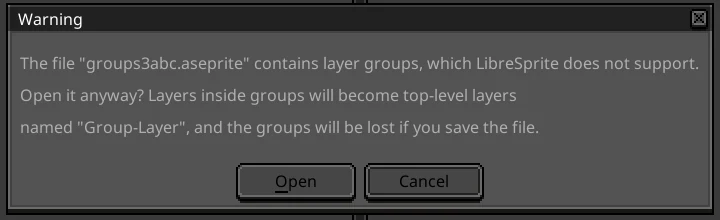


Don’t save over an Aseprite file you still need
If you save the file from LibreSprite, groups, slices, tilemaps and anything else LibreSprite dropped are gone from it. Use File → Save As with a new name. Going the other way, Aseprite is built to read files from older versions, but we have not tested a LibreSprite-saved file in Aseprite ourselves.
Scripts, extensions and themes
- Aseprite scripts do not run in LibreSprite. Aseprite uses Lua; LibreSprite uses JavaScript with its own API (
app,sprite,commandand friends). Simple scripts can be rewritten. See LibreSprite scripting. - Themes: many community themes work in both, though older themes may lack some 1.3 icons. Opening an
.aseprite-extensionfile in LibreSprite 1.3 unpacks it into the themes folder and selects it as the theme. Script, palette and language extensions are not supported. See themes. - Palettes (
.gpl,.pal, PNG) work in both: importing palettes.
Shortcuts: mostly the same, with traps
We compared both programs’ default key files: most bindings are identical, but a few matter. Ctrl+E is Merge Down in LibreSprite and Export Sprite Sheet in Aseprite. New Layer is Ctrl+Shift+N versus Shift+N, and Show Grid is Shift+G versus Ctrl+'. The full table is on the shortcuts page.
Price and licence
LibreSprite is free under the GNU GPL v2. You can install it on any number of machines, give copies to anyone, change it and publish your changes. Aseprite is a one-off purchase. On 1 November 2026, Steam listed it at $19.99, and Aseprite’s own store sells keys through Paddle and itch.io. Its source code is on GitHub under the Aseprite EULA. That EULA lets you compile it for your own use, but not share the result. We explain exactly what that allows on Is Aseprite free?
Art you make is yours in either program. Neither licence claims your sprites, and both allow commercial games and art.
Development activity
Aseprite is developed by Igara Studio, the company behind it, and ships updates often: 1.3.18.6 was its latest release on 1 November 2026. LibreSprite is maintained by volunteers. It had a long gap between 2016 and 1.0 (2021), then picked up pace: 1.1 in 2024, 1.2 in 2025, 1.3 in October 2026. The master branch was already 50 commits past 1.3 when we checked. With 8,703 GitHub stars, it is one of the most popular free pixel-art editors.
Switching between them
- From Aseprite to LibreSprite: the interface, menus and tools will feel familiar; Aseprite tutorials from before about 2017 apply almost one-to-one. Flatten groups yourself first if you want control over layer names, and export slices and tilemaps to PNG before you switch.
- From LibreSprite to Aseprite: your
.asefiles, palettes and most habits carry over. Re-learn the shortcuts in the table above, and port JavaScript scripts to Lua.
FAQ
Is LibreSprite just a free Aseprite?
It is a free editor that started as Aseprite’s 2016 code. It is not a cracked or repackaged Aseprite, and it does not include anything Aseprite added after August 2016. It is legal: the code it came from was GPL-licensed.
Which version of Aseprite is LibreSprite based on?
The last GPL commit before Aseprite’s licence change on 26 August 2016, between the Aseprite 1.1 and 1.2 releases. LibreSprite’s version numbers (1.0 to 1.3) are its own and do not match Aseprite’s.
Is LibreSprite better than Aseprite?
For features and polish, Aseprite is ahead. LibreSprite is better if price, an open licence or sharing matter to you. For drawing and animating sprites, both do the job.
Can I use Aseprite tutorials for LibreSprite?
For basics (tools, layers, frames, export), yes. Anything about groups, tilemaps, slices, the gradient tool or Lua scripts won’t apply.
Can LibreSprite use Aseprite extensions?
Only themes. Opening an .aseprite-extension installs it as a theme. Script, palette and language extensions don’t work.
Is Aseprite on Android? Is LibreSprite?
Aseprite has no Android version. LibreSprite has an official 1.2 pre-release APK; see LibreSprite on Android.
Keep going
Found something wrong or out of date? Tell us: hello@libresprite.dev. We fix mistakes within a day.