Get it · Online
LibreSprite online: the browser version
There is an official LibreSprite you can run in a web browser, with no install. It is an older development build, and it forgets your files when you close the tab. Here is what we found when we drew, saved and downloaded a sprite with it.
On this page 6 sections
Short answer
Is there a LibreSprite web version?
Yes: libresprite.github.io/online runs the real program, compiled for the browser. It is a 1.2-dev build (older than the current 1.3), downloads about 30 MB on first load, and keeps files only until you reload or close the page. Use File → Share to download your work. For regular use, install the desktop app; it is free and much more reliable.

What we tested
| Step | Result |
|---|---|
| Open the page (Chromium) | works It reloads itself once (to enable the features it needs), downloads ~30 MB and shows the Home tab after about 20 seconds. |
| New sprite, draw with the Pencil, zoom | works Same interface and shortcuts as the desktop app. |
| Save (Ctrl+S) | in the browser only Saves into a virtual folder called web_user, inside the page, not on your computer. |
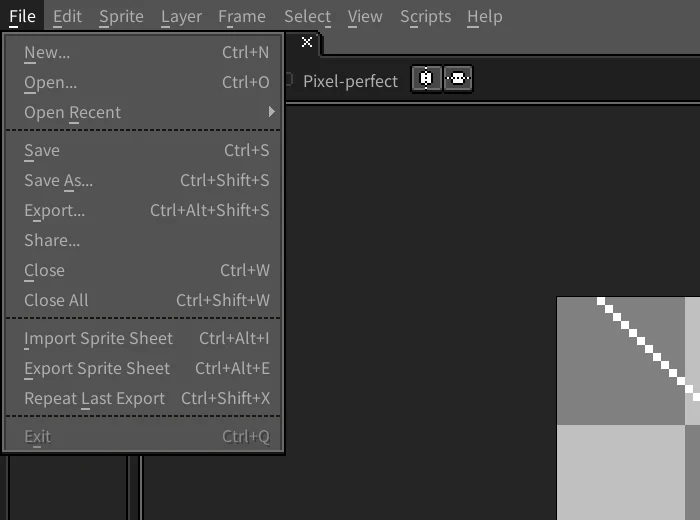
| File → Share… | works Downloads the saved file to your computer: our 32 × 32 PNG arrived intact. |
| Reload the page, File → Open | files gone The web_user folder was empty again. |
| Open a file from your computer | not found The Open dialog only shows the browser’s virtual folder; we found no upload option. |

How to keep your work
Save inside the page
Ctrl+S, type a name with the format you want (
walk.asekeeps layers and frames,walk.pngorwalk.giffor sharing), OK.Download it
File → Share…. Your browser downloads the file. Do this for every file you want to keep, before closing or reloading the tab.
Continue on the desktop app
The downloaded
.aseopens in the installed LibreSprite on Windows, macOS or Linux.
Requirements and limits
- A desktop browser with WebGL and WebAssembly threads (current Chrome, Edge, Firefox or Safari). The page sets itself up with a service worker on the first visit.
- It is not the current version: features and fixes from 1.3 (new symmetry modes, pixel-art line snapping and others) are missing. See releases.
- Keyboard shortcuts that the browser itself uses (Ctrl+W, Ctrl+T, Ctrl+N in some browsers) may be taken by the browser instead of LibreSprite.
- On phones and tablets the interface is tiny and expects a mouse and keyboard; Android users are better served by the APK.
Running a newer web build yourself
LibreSprite’s source has an emscripten folder for the browser build, and the development branch added an automated web build on 11 October 2026. The 1.3 release itself ships no web build. If you build one, serve it from a web server that sends the cross-origin isolation headers (COOP and COEP) or uses a service worker as the official page does. Opening the HTML file directly from disk will not work.
Other pixel-art editors that run online
| Editor | Why consider it |
|---|---|
| Piskel | Free and open source, made for the browser, simple animation with live preview and GIF export. |
| Pixelorama | Free and open source (MIT), with a web version as well as desktop builds; layers and animation. |
A full comparison is on the best free pixel-art software.
FAQ
Is LibreSprite online free?
Yes, like the desktop app. It runs on the LibreSprite project’s GitHub Pages site; no account needed.
Where are my files in LibreSprite online?
In a virtual folder inside the page (web_user). They disappear when you reload or close it, so download them with File → Share.
Can I use LibreSprite on a Chromebook without installing?
Yes, through the web version, with the limits above. Installing the Linux version on a Chromebook works better: Chromebook options.
Does it work offline?
Not reliably: it needs to download its 30 MB the first time, and nothing you save in it is kept.
Keep going
Found something wrong or out of date? Tell us: hello@libresprite.dev. We fix mistakes within a day.