Guide · Godot
Sprite sheets from LibreSprite to Godot
The simplest pipeline: export a horizontal strip from LibreSprite, drop it into Godot, and slice it into an animation. This guide uses Godot 4 and our demo sprite (4 frames of 32 × 32, 120 ms each). We checked every step in Godot 4.7.2 with a sheet exported by LibreSprite 1.3.
On this page 7 sections
Short answer
How do I use LibreSprite sprites in Godot?
In LibreSprite, File → Export Sprite Sheet as a horizontal strip PNG. In Godot 4, add an AnimatedSprite2D, create a new SpriteFrames resource, click “Add frames from a Sprite Sheet”, pick the PNG, set the grid to 4 × 1 (your frame count), select all frames, and add them. Set the animation speed in FPS (120 ms ≈ 8.3 FPS) and set texture filtering to Nearest so pixels stay sharp.
1. Export from LibreSprite
One animation per sheet (simplest)
File → Export Sprite Sheet (Ctrl+Alt+E), type Horizontal Strip, Output File
walk.png. If the sprite has several tagged animations, export each tag separately, or export one sheet with JSON (below).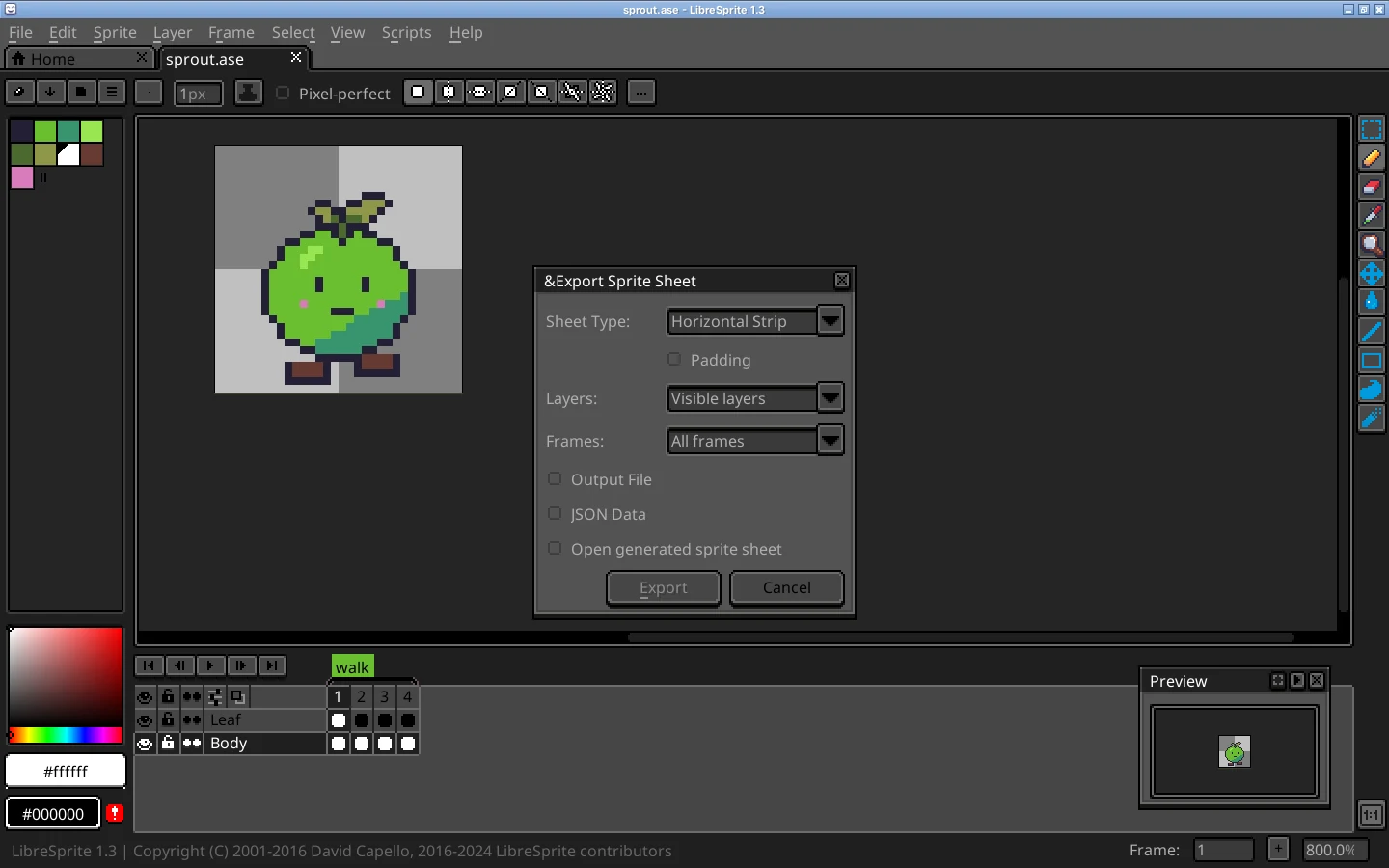
Real screenshot · Linux (Ubuntu 24.04, X11) · LibreSprite 1.3 (AppImage)File → Export Sprite Sheet (Ctrl+Alt+E): sheet type, layers, frames, output file and JSON data. Or from the command line
libresprite -b --frame-tag walk hero.ase --sheet walk.pngexports just the frames of the “walk” tag. All CLI options.
2. Import into Godot 4
Crisp pixels
Project → Project Settings → Rendering → Textures → Canvas Textures → Default Texture Filter: Nearest. (Without this, sprites look blurry when scaled.)
Add the PNG
Drag
walk.pnginto the FileSystem dock.AnimatedSprite2D
Add an AnimatedSprite2D node. In the Inspector, Sprite Frames → New SpriteFrames, then open it (the SpriteFrames panel appears at the bottom).
Add frames from the sheet
Click the grid icon Add frames from a Sprite Sheet, choose
walk.png, set Horizontal to 4 and Vertical to 1, click “Select/Clear All Frames”, then “Add Frame(s)”.Timing
Rename the animation to “walk”, set its speed to 8.3 FPS (1000 ÷ 120 ms) and turn on Loop. Godot uses one speed per animation; for frames with different durations use the per-frame duration multipliers. Our ms ↔ FPS converter does the maths.
Play
Turn on Autoplay, or call
$AnimatedSprite2D.play("walk")from a script.
What we verified in Godot 4.7.2
We built a small Godot 4.7.2 project around LibreSprite’s 128 × 32 horizontal strip and rendered it with Godot’s movie mode:
- An AnimatedSprite2D whose SpriteFrames use four 32 × 32 regions of the sheet (AtlasTexture) at 8.333 FPS played frames 0, 1, 2, 3 and looped, a new frame about every 0.1–0.13 s (Godot advances on its own frame ticks), so on average the 120 ms LibreSprite set.
- A Sprite2D with
hframes = 4, frame changed from a script every 0.12 s, showed the same four frames. - The same scene rendered with texture filter Nearest and Linear, both scaled 2×:

Alternative: Sprite2D + AnimationPlayer
Add a Sprite2D with the PNG as its texture, set Animation → Hframes to 4, then animate the Frame property (0–3) with an AnimationPlayer track, one key every 0.12 s. More setup, but it lets the same AnimationPlayer also move hitboxes, play sounds and so on.
Using the JSON and tags
For many animations in one sheet, export with JSON Data and frame tags (or --list-tags --data hero.json on the command line). LibreSprite writes the same json-hash/json-array layout as Aseprite, so Godot importers that read Aseprite JSON can usually read it. Importers that run the Aseprite program itself won’t work with LibreSprite. The community Importality add-on for Godot 4 lists LibreSprite among its supported sources. Two limits we know: LibreSprite files don’t carry Aseprite’s newer tag options (repeat counts, “ping-pong reverse”).
Making the game window pixel-perfect
Design at a small base resolution (for example 320 × 180), then in Project Settings → Display → Window set the viewport to that size, Stretch Mode to viewport or canvas_items, and Scale Mode to integer. The canvas size guide lists resolutions that scale cleanly.
FAQ
Can Godot open .ase files from LibreSprite directly?
Not out of the box; Godot imports PNGs. Export a sheet, or use an add-on that imports .ase/.aseprite files (check that it supports LibreSprite).
My sprite is blurry in Godot.
Set Default Texture Filter to Nearest (project-wide) or Texture → Filter: Nearest on the node.
My animation plays too fast.
Godot speeds are in frames per second. 120 ms per frame is about 8.3 FPS; 100 ms is 10 FPS.
Keep going
Found something wrong or out of date? Tell us: hello@libresprite.dev. We fix mistakes within a day.